
Applicable to models: Dimplex Hub, GW100
Issue: Red light on Hub after changing internet router/provider
What this means: Hub is not seeing an internet connection
Action:
Use the Dimplex Control app to set the correct connection type for the hub, either Ethernet or WiFi. If you have changed from WiFi to Ethernet as part of changing your internet supplier, you need to tell the Hub it is now using Ethernet. To do this, tap on Hubs, then tap on the 3 dot icon to the right of the hub name. Tap on "Change Hub Connection" and follow the on screen prompts.
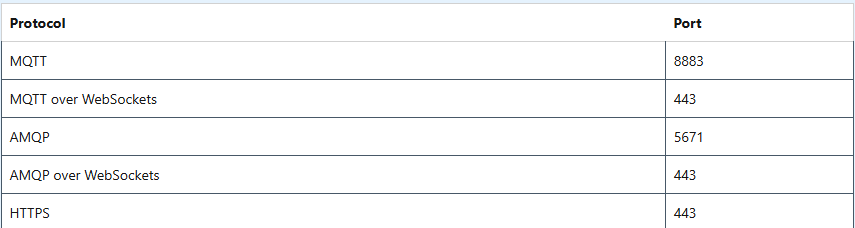
If this does not resolve the issue, there may be a problem with certain internet protocols being blocked either by your ISP, or by the Admin of your internet service if this is in a commercial environment.
The following protocols and ports must be allowed through to the hub for it to function correctly:
Require additional help? Please follow link below
https://glendimplexservice.freshdesk.com/a/solutions/articles/79000136321
Keywords:
Security, Protocol, Port
Was this article helpful?
That’s Great!
Thank you for your feedback
Sorry! We couldn't be helpful
Thank you for your feedback
Feedback sent
We appreciate your effort and will try to fix the article